Keep the checks honest.
Surface skipped tests, removed assertions, and new suppressions in supported TypeScript and JavaScript changes.
Explore test integrity ↗ by Winch Labs
Check the change. Follow the evidence. Give your agent a clear next step.
Keep your team in control of what ships.
Free local checks · Setup with your team · No card required
deltz / checkLocal illustration describe('checkout', () => { it('rejects an expired card', () => { it.skip('rejects an expired card', () => { expect(result.ok).toBe(false) })})This change disables an existing test. Bring the assertion back into the loop before treating CI as evidence.
↳ tests/checkout.test.ts:15Illustrative examples, not a live scan. A passing check applies to its evaluated scope; it does not prove the whole application is correct.
LESS GUESSWORK. MORE EVIDENCE.
The agent’s summary is the start of the review. Deltz brings checks, source evidence, and the limits of that evidence into the same conversation.
Surface skipped tests, removed assertions, and new suppressions in supported TypeScript and JavaScript changes.
Explore test integrity ↗Bring confirmed infrastructure conventions and supported security checks into a review, with findings linked to the code.
Explore supported checks ↗See incomplete inputs and missing evidence alongside findings. A missing source should never look like a clean review.
Explore an evidence gap ↗IN THE LOOP. OUT OF YOUR WAY.
Give your agent structured findings it can act on. Check, edit, and check again from the repository you already work in.
We supply the matching Deltz build and agree the supported checks with your team.
Configure local instructions and MCP using the commands alongside.
Read the findings and coverage, make an edit, then re-check before review.
After installing the build supplied for your setup, run inside your Git repository. The executable is named garboard.
garboard init --harness claude-codeRestart Claude Code and approve the local MCP server. Repository instructions guide the agent to check its changes.
garboard init --harness codex
codex mcp add garboard -- garboard mcpConfigure the local server and repository instructions. Confirm your agent can list and call the tools before relying on the workflow.
garboard init --harness cursorReload Cursor to pick up the local MCP configuration and repository rules. Check tool access in your workspace.
garboard gate --changed --base origin/main --format json

# Start the local stdio MCP server
garboard mcpUse the actual base branch for your repository; it must exist locally. Structured output includes findings and coverage.
FROM A FINDING TO A DECISION
Useful verification explains its scope. Keep the code, the rule, and the next action together so people and agents can make sense of the result.
Findings point to a file and line. Follow the evidence instead of decoding a vague review comment.
Static findings, runtime tests, and protected approval answer different questions. Keep their scope visible.
Build the review loop around the current change. Re-check after an edit rather than carry a result forward.
Deltz informs the review. Your team controls approval, merge, and deployment.
BUILT ON INFRASTRUCTURE REVIEW
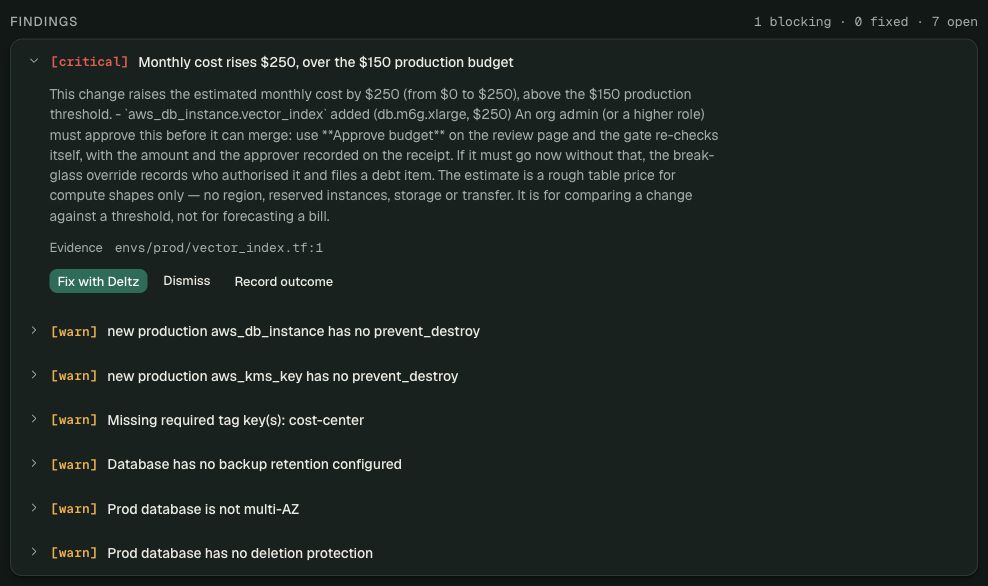
Review infrastructure safeguards, cost context, and repository conventions. Bring a focused review into the pull request your team already uses.
Run deterministic checks offline, without a model API key or cloud credentials.
Your coding harness and CI run your application code. Deltz’s local check is not a hosted test runner.
Talk to us about Enterprise and self-hosted requirements, with scope agreed for your team.
START WITH ONE REPOSITORY
Run local checks and choose a repository review plan. We help you connect the supported workflow and confirm setup before activation.
$0/ month
Up to 3 repositories
20 review credits per month
$299/ month
Up to 10 repositories
100 review credits per month
Let’s talk.
Custom review capacity
Self-hosted & on-premises options
Repository plans cover infrastructure review. Team is US$299 per organization, billed monthly. See plan scope & review credits ↗
A FEW GOOD QUESTIONS
Supported infrastructure checks cover safeguards and repository conventions. The agent setup also supports scoped TypeScript and JavaScript integrity checks, such as skipped tests, removed assertions, and new suppressions. We confirm your build and check scope during setup. Static checks do not execute your tests or prove runtime behavior.
Deltz provides local configuration for Claude Code, Codex, and Cursor, plus a CLI and stdio MCP server. Start with the setup steps above. Tool permissions and behavior depend on your harness, so verify the connection in your repository.
No. A clean local result describes the checks that ran. Customer CI, business behavior, and protected approval need their own evidence. Deltz keeps coverage and missing inputs visible.
Deltz supports infrastructure review through a GitHub App, with findings and check results attached to the pull request. We configure repository access and the supported review scope with your team. Local agent checks complement that workflow.
No. Your team keeps control of approvals, merges, and deployment. Deltz does not apply changes to your cloud.
MAKE THE NEXT CHANGE EASIER TO TRUST
One repository. One real change. A clear next step.